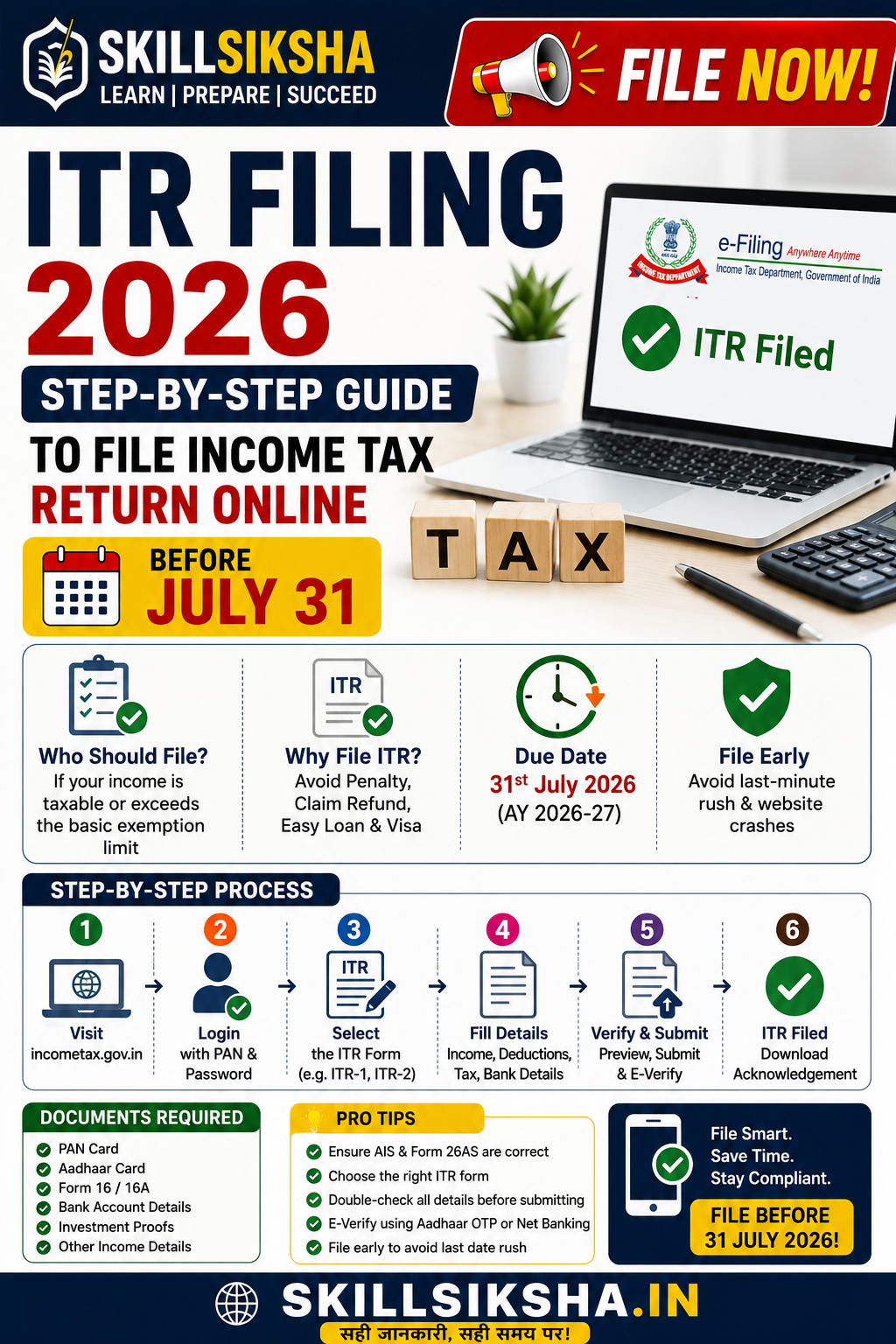
ITR Filing 2026: Step-by-Step Guide to File Income Tax Return Online Before July 31
ITR Filing 2026: How to File Income Tax Return Online Before July 31 Deadline (Step-by-Step Guide)
The tax season is officially here, and the clock is ticking! If you are an Indian taxpayer, July 31, 2026, is the most critical date on your calendar. This is the official deadline to file your Income Tax Return (ITR) for the Financial Year (FY) 2025-26 (Assessment Year 2026-27) without paying any late fines or penalties.
Filing your taxes can feel overwhelming, but skipping it or rushing at the last minute can lead to costly mistakes, notices from the Income Tax Department, or hefty fines.
In this ultimate guide, we will break down everything you need to know about ITR filing in 2026—from the latest tax slab changes to a complete step-by-step online filing process.
Why You Should Not Wait Until July 31st
Many taxpayers make the mistake of waiting until the final weekend of July. Here is why you should file your ITR right now:
-
Avoid Penalties: Filing after July 31 attracts a late fee under Section 234F, ranging up to ₹5,000.
-
Faster Refunds: The earlier you file and verify, the quicker the Income Tax Department processes your return and deposits your refund.
-
Website Crashes: The official e-filing portal receives massive traffic in the final days, often leading to slow loading times or technical glitches.
-
Easy Loan Approvals: If you are planning to apply for a home loan, car loan, or a visa, a continuous history of timely filed ITRs serves as your primary income proof.
New Tax Regime vs. Old Tax Regime: What’s Different This Year?
Before you hit the "File Now" button, you must understand the current tax structures.
-
Default Option: The New Tax Regime remains the default choice for taxpayers. If you want to opt for the Old Tax Regime to claim deductions like HRA, 80C, or 80D, you must explicitly select it while filing your form.
-
The Smart Choice: For salaried individuals with standard investments, the New Tax Regime offers lower tax rates and an increased standard deduction, making it highly attractive for those who prefer straightforward tax calculations without locking money into long-term savings.
Documents Checklist: Gather These Before You Start
To ensure a seamless, error-free filing experience, keep the following documents ready on your screen:
-
PAN Card & Aadhaar Card: Ensure they are linked.
-
Form 16: Issued by your employer, detailing your total salary earned and the TDS deducted.
-
Annual Information Statement (AIS) & Taxpayer Information Summary (TIS): Available directly on the e-filing portal, showing all your financial transactions, stock market gains, dividend incomes, and savings interest accrued during the year.
-
Form 26AS: To verify the total tax deducted at source (TDS) by your employers or banks.
-
Bank Account Details: Account number and IFSC code of the account where you wish to receive your tax refund.
-
Investment Proofs: (Only if choosing the Old Tax Regime) Receipts for ELSS, LIC, PPF, school fees, home loan interest, and health insurance.
Step-by-Step Guide: How to File Your ITR Online in 2026
Filing your return online through the official government portal is completely free and takes less than 20 minutes if you follow these steps:
Step 1: Log In to the E-Filing Portal
-
Go to the official website: incometax.gov.in.
-
Click on Login on the top right.
-
Enter your User ID (which is your PAN Number) and password. If you are a new user, register using your PAN and Aadhaar details.
Step 2: Initiate the ITR Filing Process
-
Once logged in, go to the dashboard and click on e-File > Income Tax Returns > File Income Tax Return.
-
Select the current Assessment Year: AY 2026-27.
-
Choose your Mode of Filing as Online and click Proceed.
-
Select Start New Filing.
Step 3: Choose Your Status and the Correct ITR Form
-
Select your status as Individual and proceed.
-
The system will help you choose the right ITR form.
-
ITR-1 (Sahaj): For salaried individuals, house property income, or interest income totaling up to ₹50 lakh.
-
ITR-2: For individuals with capital gains (stock market, cryptocurrency, mutual funds, or property sales).
-
ITR-3 / ITR-4: For individuals running businesses or working as digital freelancers/professionals.
-
Step 4: Validate Your Pre-Filled Data
The income tax portal automatically fetches most of your data from Form 16 and AIS. You will see five tabs that you need to review and confirm:
-
Personal Information: Verify your name, address, contact details, and bank account preferences.
-
Gross Total Income: Check if your salary, interest income, or rental income matches your Form 16.
-
Total Deductions: Check your standard deduction and add any other exemptions you qualify for.
-
Tax Paid: Verify that the TDS deducted by your employer matches your Form 26AS exactly.
-
Total Tax Liability: The system will automatically compute your final tax. If you owe more tax, pay it online immediately via Net Banking or UPI. If you have overpaid, the system will show your Refund Amount.
Step 5: Preview and Submit Your Return
-
Review the summary of your ITR to ensure there are no spelling mistakes or missed income columns.
-
Click on Proceed to Validation. The system will check for errors. If it shows "Validation Successful," you are ready to submit.
Step 6: The Golden Step – e-Verification
Your ITR filing is incomplete until you verify it! You have a strict deadline to verify your return after submitting it, but it is best to do it instantly.
-
Select the e-Verify Now option.
-
The easiest way is using Aadhaar OTP. You will receive a code on your mobile number registered with Aadhaar.
-
Enter the OTP, click submit, and your ITR is officially filed! You will receive an acknowledgment form (ITR-V) via email.
Common Pitfalls to Avoid While Filing ITR
To prevent receiving an official notice or correction request from the Income Tax department, avoid these common mistakes:
-
Concealing Income: Do not hide side incomes, interest earned on savings bank accounts, or crypto profits. Everything is automatically recorded in your AIS form.
-
Selecting the Wrong ITR Form: Filing ITR-1 instead of ITR-2 when you have capital gains from stocks can result in your return being declared defective.
-
Unlinked PAN-Aadhaar: Ensure your cards are linked, otherwise, your return will not process, and refunds will be withheld.
-
Forgetting to e-Verify: An unverified ITR is treated as invalid by law.
The Bottom Line
Filing your Income Tax Return does not have to be a stressful, last-minute rush. By compiling your documents early, cross-checking your details with your digital AIS profile, and executing the online filing steps today, you can enjoy a smooth, penalty-free tax season.
Head over to the e-filing portal today and secure your financial record before the July 31st rush begins!
Related Articles

Affiliate Marketing कैसे कराती है कमाई? पूरी जानकारी और स्टेप-बाय-स्टेप गाइड 2026
READ MORE →
Constitution (131st Amendment) Bill 2026 Explained: Why Women’s Reservation Bill Failed in Lok Sabha
READ MORE →